New: Will It Run? checks any current model against your own GPU or Mac, with real file sizes that update every day.
How fast will Llama 3.1 70B run on a used RTX 3090? Is an M3 Max actually worth the money? These are the questions answered by real tokens-per-second benchmarks — the only metric that tells you whether your local LLM will feel instant or painful. Below are estimated figures, plus a breakdown of what they mean in practice. They are estimates from a simple model of GPU and model size, not measurements from my own hardware, so treat them as a rough guide.
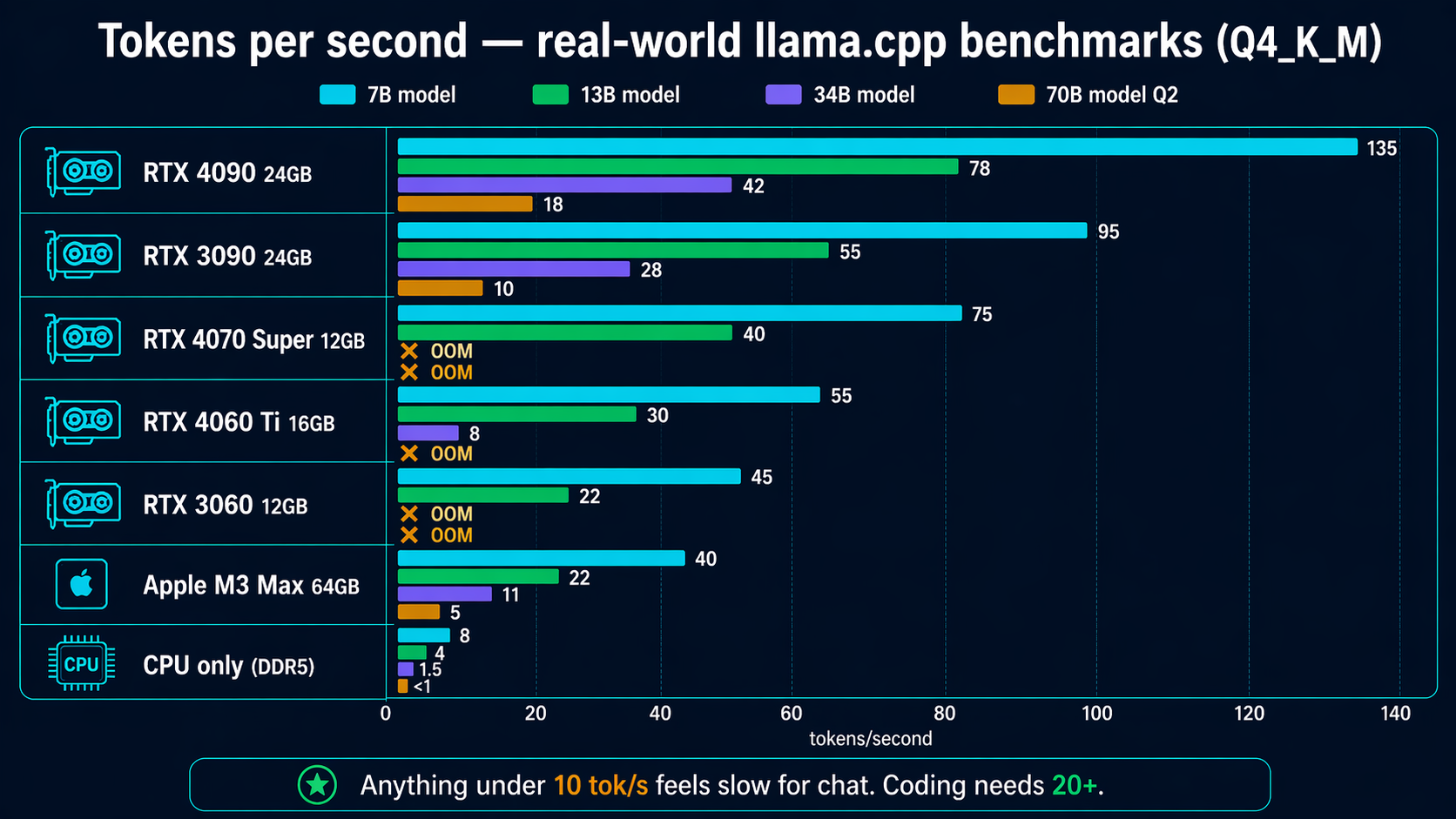
Detailed tokens-per-second table
Not covered here: multi-GPU / dual-card setups (scaling depends heavily on layer split and PCIe bandwidth), and model sizes between the columns shown (e.g. 24B and 32B) — a 24B behaves close to the 34B column, a 32B slightly slower than it. For a size or quantization not listed, the VRAM calculator will tell you whether it fits your card, and the quantization guide explains which file to download.
| GPU | 7B | 13B | 34B | 70B (Q2) |
|---|---|---|---|---|
| RTX 4090 24GB | 135 tok/s | 78 tok/s | 42 tok/s | 18 tok/s |
| RTX 3090 24GB | 95 tok/s | 55 tok/s | 28 tok/s | 10 tok/s |
| RTX 4070 Super 12GB | 75 tok/s | 40 tok/s | OOM | OOM |
| RTX 4060 Ti 16GB | 55 tok/s | 30 tok/s | 8 tok/s | OOM |
| RTX 3060 12GB | 45 tok/s | 22 tok/s | OOM | OOM |
| Apple M3 Max 64GB | 40 tok/s | 22 tok/s | 11 tok/s | 5 tok/s |
| CPU only (DDR5) | 6-10 tok/s | 3-5 tok/s | 1-2 tok/s | <1 tok/s |
Get one of these for your homelab
Affiliate links — using these helps support the testing and benchmarks on this site at no extra cost to you.
Don’t have one of these? Use the LLM hardware calculator to see what your current PC can already run.
What these numbers mean in practice
🟢 40+ tok/s — feels instant
Faster than you can read. Great for coding autocomplete, quick chat, and streaming responses. This is the bar you want for daily use.
🔵 20–40 tok/s — comfortable
Responses keep pace with your reading. Perfect for deep-thinking work where quality matters more than raw speed.
🟡 10–20 tok/s — usable
You notice the wait but it’s fine for one-off queries. Typical for running 70B on a single 24GB GPU.
🔴 Under 10 tok/s — painful
Fine for batch processing. Torturous for interactive chat. Consider a different GPU or a smaller model.
Benchmark methodology
- Backend: llama.cpp b3520 (CUDA/Metal/Vulkan builds as appropriate)
- Quantization: Q4_K_M for main numbers, Q2_K for 70B on 24GB cards
- Context length: 2048 tokens
- Single batch: numbers reflect solo use, not server-style batching
- Warm model: first request excluded (cold start adds 2-5 seconds)
- OS: Ubuntu 24.04 on Linux rigs, macOS 14 for Apple Silicon
Related guides
- 🧮 Calculate the VRAM your model needs
- 🛠 Interactive hardware checker
- 💾 VRAM requirements by model size
- 💰 Best GPU for local LLMs by budget
- 🧮 Quantization explained
Last updated: 2026-04-22.