New: Will It Run? checks any current model against your own GPU or Mac, with real file sizes that update every day.
Every local LLM tutorial throws around cryptic labels like Q4_K_M, Q5_0, Q8_0. Nobody explains what they mean. Here’s the plain-English version: quantization shrinks model weights from 16-bit floats down to 4 or 2 bits each, trading a little quality for a LOT of VRAM savings.
| Quant | When to use it |
|---|---|
Q5_K_M | The default pick: about 96% of original quality at about 40% of the file size. |
Q6_K / Q8_0 | You have VRAM to spare. |
Q4_K_M | VRAM is tight. The simpler choice if it fits; faster and more widely supported than IQ4_XS. |
Q4_K_S | Q4_K_M spills over your VRAM. A few hundred MB smaller, with a small quality dip. |
IQ4_XS | You are a few hundred MB short for Q4_K_M. Typically smaller at comparable quality. |
Q5_K_S | You want a little VRAM back without dropping to 4-bit. |
Quantization formats compared (at a glance)
Scanning for the one to download? Here is every common GGUF format side by side. File-size and quality figures are approximate general guidance (they shift a little per model) — not per-model benchmarks.
| Format | Bits | File size | Quality | Speed | Best for |
|---|---|---|---|---|---|
| Q8_0 | 8 | Largest | ~99% | Fast | Plenty of VRAM, near-reference output |
| Q6_K | 6 | Large | ~98% | Fast | Maximum quality on an 8 GB card |
| Q5_K_M ★ | 5 | Medium | ~96% | Fast | The default — best balance |
| Q5_K_S | 5 | Medium− | ~95% | Fast | Shave a little VRAM off Q5_K_M |
| Q4_K_M | 4 | Small | ~94% | Fast | Most popular; tight VRAM |
| Q4_K_S | 4 | Small− | ~92% | Fast | Squeeze just under a VRAM limit |
| IQ4_XS | 4 (i-quant) | Smallest 4-bit | ~93% | Slightly slower | Smallest 4-bit at good quality (needs imatrix) |
| Q3_K_M | 3 | Very small | ~88% | Fast | Only if Q4 will not fit |
| Q2_K | 2 | Tiny | ~78% | Fast | Emergency: big model, tiny VRAM |
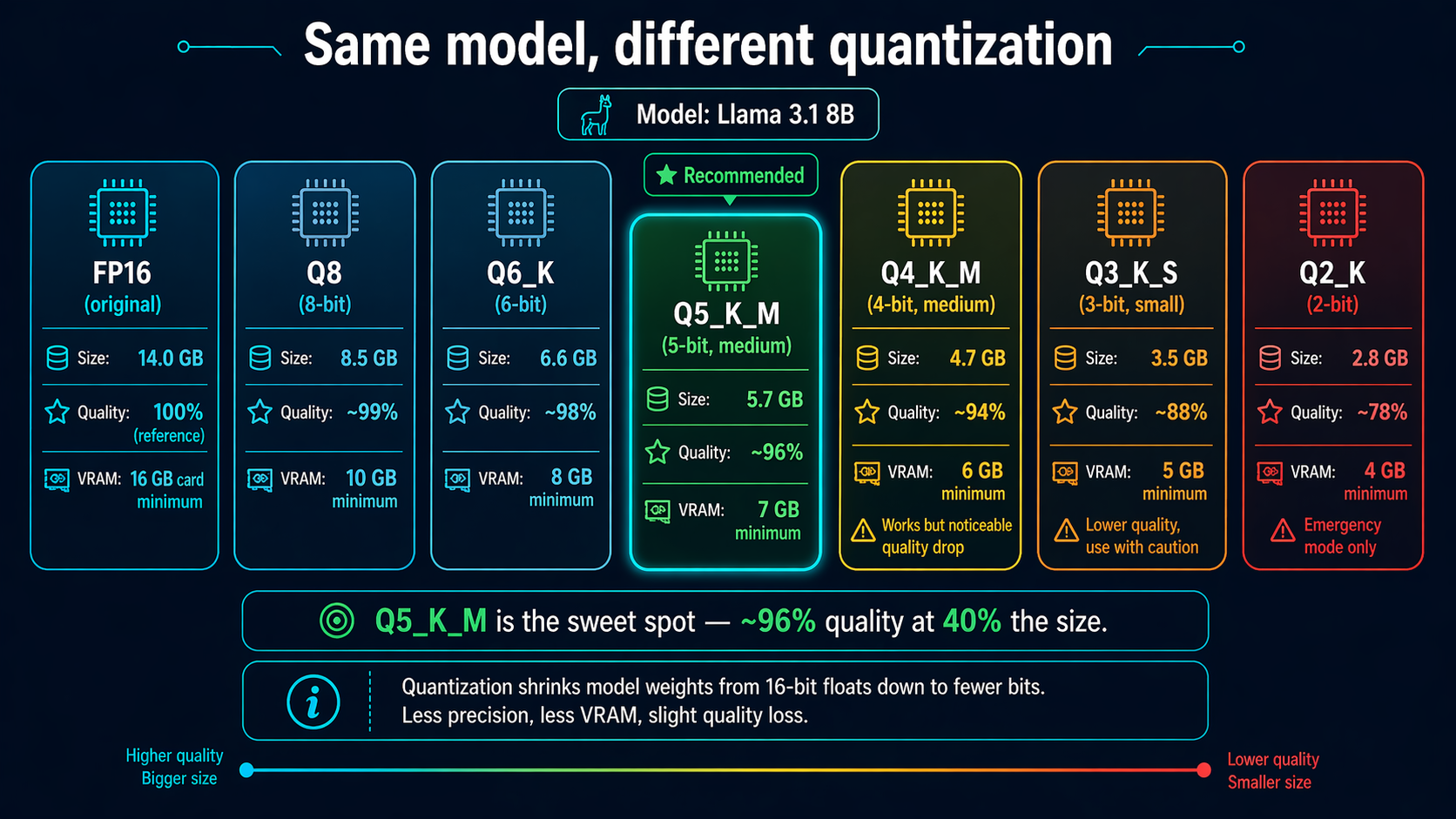
The quantization ladder
FP16 — the original, full precision
Size: 14 GB (Llama 3.1 8B) · Quality: 100% · VRAM: 16 GB minimum
What the model was trained as. Only worth running if you have the VRAM and need benchmark-grade quality.
Q8_0 — 8-bit, near-reference
Size: 8.5 GB · Quality: ~99% · VRAM: 10 GB
Effectively lossless. If you have the VRAM, this is the highest reasonable quant for production work.
Q6_K — 6-bit, strong balance
Size: 6.6 GB · Quality: ~98% · VRAM: 8 GB
Barely distinguishable from Q8 in blind testing. Good for 8GB cards that want max quality.
★ Q5_K_M — the sweet spot
Size: 5.7 GB · Quality: ~96% · VRAM: 7 GB
The consensus “best bang for buck” quant. Barely noticeable quality loss, ~40% the size of FP16. If you don’t know which quant to pick, pick this one.
Q4_K_M — 4-bit, most popular
Size: 4.7 GB · Quality: ~94% · VRAM: 6 GB
The de-facto default on HuggingFace. Noticeable but acceptable quality drop. Best when you need to fit a model on tight VRAM.
Q3_K_S — 3-bit, compact
Size: 3.5 GB · Quality: ~88% · VRAM: 5 GB
You’ll notice clunkier responses and occasional coherence issues. Only use if Q4 won’t fit.
Q2_K — 2-bit, emergency mode
Size: 2.8 GB · Quality: ~78% · VRAM: 4 GB
Use ONLY when you absolutely need to fit a big model on small VRAM (e.g., Llama 70B on a 24GB card). Noticeable quality degradation.
What do those cryptic letters mean?
- Q = quantized (vs. F for full precision)
- The number (Q4, Q5, Q8) = how many bits per weight
- _K = uses K-quants (newer, better quality than old _0 / _1)
- _M = “medium” — intermediate importance weights kept at higher precision
- _S = “small” — more aggressive compression, less quality
- _L = “large” — less aggressive compression, more quality
So Q5_K_M = 5-bit quantization using K-quants with medium-tier quality preservation. In 99% of cases you want _K_M variants.
K_S vs K_M: which should you pick?
- _M (“medium”) — keeps attention and feed-forward weights at higher precision. Best quality for the bit level; slightly larger file.
- _S (“small”) — more aggressive, more even compression. Smaller file, slightly lower quality, and often marginally faster because there is less to read from VRAM.
Q4_K_S vs Q4_K_M: Q4_K_S is a few hundred MB smaller with a small, usually-acceptable quality dip. Pick Q4_K_M unless it spills over your VRAM — then Q4_K_S is the natural step down.
Q5_K_S vs Q5_K_M: both are excellent and the gap is tiny. Q5_K_M is the go-to; choose Q5_K_S only to reclaim a little VRAM without dropping to 4-bit.
IQ vs Q: what are i-quants (and IQ4 vs Q4)?
IQ formats (“i-quants”) use an importance matrix plus non-linear quantization to pack more quality into fewer bits than the older Q..._K scheme. In general they are smaller than the equivalent K-quant at similar quality, but they can be slightly slower on some hardware (older GPUs and CPU-only setups especially) and must be built with an imatrix.
- Choose IQ when you need the smallest possible file at a given quality and your runtime/hardware handles it well.
- Choose plain Q…_K when you want maximum compatibility and the fastest, most predictable speed.
IQ4 vs Q4: IQ4_XS is typically smaller than Q4_K_M at comparable quality — ideal for squeezing a model into VRAM — while Q4_K_M is faster and more universally supported. If it fits, Q4_K_M is the simpler choice; if you are a few hundred MB short, IQ4_XS often saves the day. These are general tendencies, not per-model measurements.
Which quantization should I download?
| Your situation | Recommended quant |
|---|---|
| “I have a 24GB card and want maximum quality” | Q8_0 or Q6_K |
| “I want best balance of quality and size” | Q5_K_M ★ |
| “I want to run a bigger model than my VRAM normally allows” | Q4_K_M |
| “I’m fitting a 70B on a 24GB GPU” | Q2_K (painful but works) |
| “I’m fitting a 405B on 80GB” | Q4_K_M or Q3_K_M |
Common questions
Which quantization should I download?
For most people, Q5_K_M — near-full quality at ~40% the size. Go Q6_K/Q8_0 if you have VRAM to spare, or Q4_K_M if it is tight.
K_S vs K_M — what is the difference?
_M keeps important weights at higher precision (better quality, slightly larger); _S compresses more (smaller, marginally lower quality). K_M is the default; use K_S only to fit VRAM.
Is IQ4 better than Q4?
IQ4_XS is usually smaller than Q4_K_M at similar quality, but Q4_K_M is faster and more widely supported. Pick IQ4 to save VRAM; pick Q4_K_M for speed and compatibility.
Related guides
- 🧮 VRAM calculator (per model & quant)
- 🛠 Interactive hardware checker
- 💾 VRAM requirements by model size
- ⚡ Tokens-per-second benchmarks
- 💰 Best GPU for local LLMs by budget
Last updated: 2026-08-19.