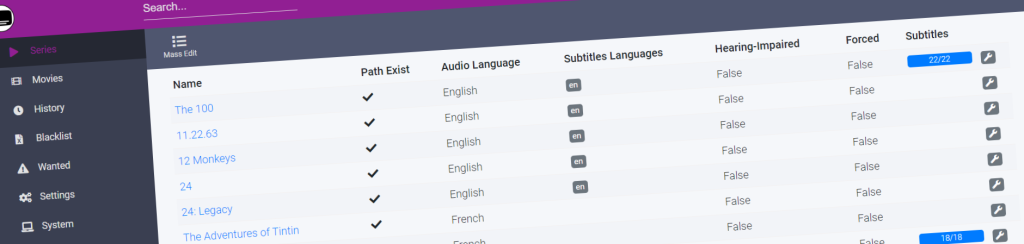
I’ve been running Bazarr in my homelab for about two years now, and it’s the kind of tool that sits quietly in the background until you realize you can’t live without it. It handles subtitle downloads for everything Sonarr and Radarr pull in, and when subtitles aren’t available through the usual channels, it can generate them using Whisper. This is my actual Bazarr Docker Compose setup with explanations of every choice I made.
Why Bazarr Became Non-Negotiable
Before I had this running, subtitles were a constant friction point. A file would download, and half the time the best subtitle wouldn’t match properly, or I’d end up with forced subtitles embedded in the video when I wanted a separate file. Manual searching was out of the question once you reach a few hundred media files. Bazarr automates the whole process and does it well enough that I barely think about subtitles anymore.
The intelligence matching is real. It doesn’t just download the first subtitle file it finds. It scores potential matches based on release name, file size, and other attributes, then picks the best one. Over time I’ve only had a handful of mismatches, and even then it’s usually because the actual release name is obscure or the uploader mislabeled things. When that happens, Bazarr lets you manually search and override, but you’re doing that rarely, not constantly.
The Whisper integration is where things get interesting. If you’re willing to let it generate subtitles from the audio track itself, you’ve got a fallback for everything. I use it selectively for older or obscure content where human-made subtitles don’t exist. It’s not perfect—accents trip it up, and technical dialogue can be mangled—but it’s better than nothing.
The Docker Compose Configuration
Here’s my setup. I’m running this on a small NUC with 8GB RAM, alongside Sonarr, Radarr, Jellyfin, and a few other services. The key is giving Bazarr enough resources to handle subtitle matching without choking the rest of the stack.
version: '3.8'
services:
  bazarr:
    image: lscr.io/linuxserver/bazarr:latest
    container_name: bazarr
    environment:
      - PUID=1000
      - PGID=1000
      - TZ=America/New_York
      # The subdomain for your reverse proxy
      - VIRTUAL_HOST=bazarr.yourdomain.local
      - VIRTUAL_PORT=6767
    volumes:
      # Config directory — where Bazarr stores settings and database
      - /home/user/docker/bazarr/config:/config
      # Mount your media library read-only. Bazarr reads file names and metadata
      - /mnt/media/shows:/shows:ro
      - /mnt/media/movies:/movies:ro
    ports:
      # HTTP port for the web interface. I expose this only on localhost
      - "127.0.0.1:6767:6767"
    restart: unless-stopped
    networks:
      - homelab
    # CPU/memory limits prevent it from starving other services
    deploy:
      resources:
        limits:
          cpus: '1.5'
          memory: 512M
        reservations:
          cpus: '0.5'
          memory: 256M

networks:
  homelab:
    external: true
A few notes on the decisions here. I’m using the Linuxserver image because their team maintains it well and includes sensible defaults. The PUID/PGID match my media user, which means Bazarr has the same file permissions as Sonarr and Radarr—no ownership headaches later. The TZ variable matters; without it, subtitle timestamps can drift if you’re working with subtitles across regions.
The read-only mounts on /shows and /movies are intentional. Bazarr only needs to read filenames and metadata. It doesn’t write back to those directories. If something goes wrong, at least your media structure can’t be corrupted by a bug or misconfiguration.
I set the memory limit to 512MB because Bazarr tends to consume whatever you give it if you’re not careful. In testing, I found it works fine under that constraint, and it prevents one runaway process from triggering OOM kills across the whole system. The CPU reservation ensures it can still do work when other containers are quiet.
Environment and Reverse Proxy Integration
I’m running this behind Caddy as my reverse proxy. It handles the HTTPS and keeps me from having to remember random ports.
bazarr.yourdomain.local {
  reverse_proxy 127.0.0.1:6767 {
    header_uri X-Forwarded-For {http.request.remote.host}
    header_uri X-Forwarded-Proto https
    header_uri X-Forwarded-Host bazarr.yourdomain.local
  }
}
If you’re using Nginx instead, the equivalent block would look like this:
server {
  server_name bazarr.yourdomain.local;
  listen 443 ssl http2;

  ssl_certificate /path/to/cert.pem;
  ssl_certificate_key /path/to/key.pem;

  location / {
    proxy_pass http://127.0.0.1:6767;
    proxy_set_header Host $host;
    proxy_set_header X-Real-IP $remote_addr;
    proxy_set_header X-Forwarded-For $proxy_add_x_forwarded_for;
    proxy_set_header X-Forwarded-Proto $scheme;
    proxy_redirect off;
  }
}
The key headers here are the X-Forwarded ones. Bazarr needs to know the real client IP and that the connection is HTTPS, otherwise it’ll get confused about redirects and CORS headers. Without these, you’ll load the Bazarr dashboard and get stuck in weird redirect loops.
First-Run Configuration Inside Bazarr
When Bazarr starts for the first time, you’ll see a setup wizard. The important parts:
In the Sonarr and Radarr sections, you need to point Bazarr at your existing *arr instances. Use the internal Docker hostname if they’re on the same network (e.g., http://sonarr:8989 instead of 127.0.0.1:8989). Add your API keys. Bazarr uses these to pull your media library metadata and to tell Sonarr/Radarr when it’s finished grabbing subtitles.
The Subliminal section is where you enable subtitle providers. I enable most of them: OpenSubtitles, TVSubtitles, Subscene, and a few others. Some require free accounts (OpenSubtitles is free but wants registration). Don’t enable everything—some providers are slow or unreliable. I’ve found OpenSubtitles and Subscene cover maybe 85% of what I need.
The Languages section is crucial. Select your preferred languages in order. I run English first, then French as a fallback. Bazarr will search for subtitles in that order and stop when it finds a match. You can override this per-series or per-movie later if you need Dutch subtitles for one specific show.
In the Scheduler section, I set Bazarr to scan for missing subtitles every 6 hours. More frequent than that starts to feel aggressive and wastes provider quota. Less frequent and you’re sitting around waiting for subtitles on newly downloaded episodes.
Integration with Whisper for Missing Subtitles
If you want Bazarr to fall back to generating subtitles using Whisper, you’ll need Whisper running separately (that’s a whole other Docker Compose, which I won’t dig into here). Once it’s up and accessible, you configure it in Bazarr under Settings > Subtitles > Subtitle Options. There’s a section for Whisper integration where you give it the URL and model size.
I run Whisper on the same network with http://whisper:7860 as the endpoint. I set it to use the base model, which is a good middle ground between speed and accuracy. The tiny model is faster but makes more mistakes. The large model is more accurate but can take 10+ minutes per episode, which defeats the purpose of automation.
A word of caution: Whisper generation is resource-intensive. On my NUC, a single 45-minute TV episode takes about 3-4 minutes to transcribe. If you’re generating subtitles for a whole season at once, expect your system to feel slow for a while. I’ve set Bazarr to only generate subtitles during specific hours (2 AM to 6 AM) to avoid interfering with my family watching things during the evening.
Permissions and File Path Gotchas
There’s a subtle issue that caught me once. Bazarr needs to write subtitle files to the same directory as your media files. If those directories have restrictive permissions, Bazarr will silently fail to save the .srt file. It’ll mark the subtitle as downloaded in the database, but the actual file won’t exist, and you won’t notice until you try to play the video.
Make sure your media directories are world-writable (or at least writable by whatever user Bazarr is running as). A quick check:
ls -la /mnt/media/shows/Breaking.Bad/If the owner isn’t your media user and the group isn’t writable, fix it:
sudo chown -R 1000:1000 /mnt/media/shows
sudo chmod -R 775 /mnt/media/shows
The 775 permission means owner and group can read/write/execute, others can only read. That’s permissive enough for Bazarr without being reckless.
Another thing: Bazarr stores its database in the /config volume. If that fills up or becomes corrupted, Bazarr will start behaving erratically. I back this up weekly because re-configuring everything from scratch is annoying. A simple cron job handles it:
0 2 * * 0 tar -czf /backup/bazarr-config-$(date +%Y%m%d).tar.gz /home/user/docker/bazarr/configMonitoring and Troubleshooting
Bazarr has decent built-in logging. Check the Logs page inside the web interface if something isn’t working. You’ll see which subtitle providers are failing, which searches matched, and why a particular subtitle was rejected.
Common issues: If Bazarr can’t connect to Sonarr or Radarr, check your API keys and make sure the hostnames resolve inside the Docker network. If subtitles are downloaded but not appearing in files, it’s usually a permissions problem. If subtitles are downloading but wrong ones are being chosen, you might need to adjust the matching sensitivity or manually select better providers.
One thing that surprised me: OpenSubtitles has rate limits. If you’re mass-scanning a large library, you can hit their limits and get temporarily blocked. Bazarr handles this gracefully by backing off, but it means your first full scan might take a day or two. After that, it’s just checking new releases, which is much faster.
I’ve noticed Bazarr occasionally crashes if the database gets corrupted due to an ungraceful shutdown. Docker restart policies usually catch this, but it’s worth monitoring. I have an Uptime Kuma check on the Bazarr web port that alerts me if it’s been down for more than an hour.
FAQ
Can Bazarr run on a Raspberry Pi?
Yes, but carefully. A Raspberry Pi 4 with 4GB RAM can handle Bazarr, but add Whisper and you’re asking for trouble. I’d recommend a Pi 5 if you want to do subtitle generation, or stick to provider-based downloads on a Pi 4. The matching algorithm itself is lightweight.
How much RAM does Bazarr need?
I run it in 256MB reserved / 512MB limit, and it rarely hits the limit. For most homelabs, 512MB is more than enough. If you’re running Whisper integration simultaneously, budget an extra 2-4GB for the transcription process itself.
Does Bazarr work with Plex or Kaleidescape?
Bazarr is built for the *arr stack (Sonarr, Radarr, etc.). It won’t integrate with Plex or Kaleidescape directly. You’d need Sonarr or Radarr managing your library for Bazarr to work. Some people run both systems, but they’re separate workflows.
What’s the difference between OpenSubtitles and Subscene?
OpenSubtitles has more content and better matching, but slower response times. Subscene is faster and good for older or niche content. I enable both and let Bazarr pick the best match. In practice, OpenSubtitles usually wins for mainstream content.
How often should I scan for missing subtitles?
Every 6 hours is my recommendation. More frequent causes unnecessary API calls; less frequent means you’re waiting longer for new episodes. Adjust based on how many new releases you get. If you add 20 movies at once, a manual scan is faster than waiting for the scheduler.
Explore Bazarr in our AI Homelab Toolkit.