In short
Connect Bazarr to Sonarr for automatic subtitle management across your TV library. Step-by-step configuration, troubleshooting, and real-world tips from running both in production.
If you’re running Sonarr in your homelab, you’ve probably noticed the subtitle problem: you download a show, it plays fine, but there are no subtitles, or they’re completely mismatched. Bazarr solves this by automating subtitle downloads and pairing them with your Sonarr library. The integration is straightforward in theory but has enough quirks that it’s worth walking through carefully.
Why Bazarr + Sonarr Matters for Subtitle Management
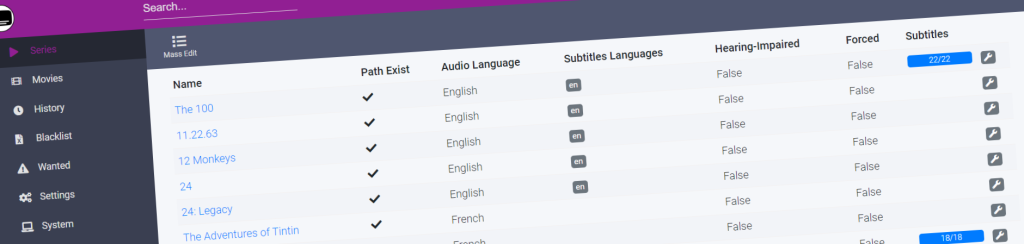
Sonarr handles getting the episodes into your library. It doesn’t care about subtitles. Radarr doesn’t either. You could manually hunt for subtitles on OpenSubtitles or subtitle forums every time you add a show, or you could let Bazarr do it automatically by watching your Sonarr folders and matching subtitles to episodes as they arrive.
What makes this integration useful is that Bazarr understands Sonarr’s folder structure and metadata. It knows you just grabbed season 3 episode 5 of something, can look up what that actually is, and download subtitles for the exact file and release group you have. It’s less “throw subtitles at everything” and more “find the right subtitle for this specific file.”
The catch: Bazarr’s matching isn’t perfect. Sometimes it grabs the wrong subtitle anyway, or finds nothing when options clearly exist. You’ll need to babysit it occasionally, especially early on. But even with that friction, it beats manual work.
Prerequisites and Network Setup
You need Sonarr already running and configured. Bazarr doesn’t replace Sonarr or require you to reconfigure anything there. Just make sure Sonarr is stable and actually downloading episodes.
Network-wise, both services need to be able to reach each other. If you’re running them in Docker, they should be on the same network. If you’re running them on separate machines or using bridged networking, you need to know Sonarr’s internal IP or hostname and the port it’s listening on (usually 8989). Bazarr runs on port 6767 by default.
You’ll also need storage that both services can access. Both read from your media directories, so they need to be mounted the same way. If Sonarr sees your shows at /mnt/media/shows, Bazarr needs to see them at the same path, not something like /media/shows or C:shows on Windows. Path mismatches are the silent killer here.
Installing Bazarr Alongside Sonarr
If you’re using Docker Compose (which you probably are if you’re running Sonarr), adding Bazarr is straightforward. Here’s what a typical setup looks like:
version: '3.8'
services:
  sonarr:
    image: lscr.io/linuxserver/sonarr:latest
    container_name: sonarr
    environment:
      - PUID=1000
      - PGID=1000
      - TZ=UTC
    volumes:
      - /opt/sonarr/config:/config
      - /mnt/media:/media
    ports:
      - "8989:8989"
    restart: unless-stopped

  bazarr:
    image: lscr.io/linuxserver/bazarr:latest
    container_name: bazarr
    environment:
      - PUID=1000
      - PGID=1000
      - TZ=UTC
    volumes:
      - /opt/bazarr/config:/config
      - /mnt/media:/media
    ports:
      - "6767:6767"
    restart: unless-stopped
    depends_on:
      - sonarr
The key parts: both containers have the same PUID and PGID (user and group IDs) so they have permission to read and write the same files. Both mount /mnt/media at the same path. Bazarr depends on Sonarr starting first.
If you’re not using Docker, grab the release from bazarr.media or install via package manager on Linux. Windows and macOS versions exist but I haven’t tested them. The principle is the same: Bazarr needs file system access to wherever Sonarr puts your shows.
Configuring Bazarr to Connect to Sonarr
Start Bazarr and navigate to http://localhost:6767 (or your server’s IP). You’ll hit a setup wizard.
Go to Settings > Sonarr. You’ll need to fill in:
- Sonarr Address: Use the internal Docker hostname if in Docker (
sonarr), or the IP/hostname if separate. If Sonarr is on the same machine but not Docker, trylocalhost:8989or127.0.0.1:8989. - Sonarr API Key: Grab this from Sonarr Settings > General. It’s a long alphanumeric string.
- Use SSL: Leave off unless you’ve set up HTTPS.
Click Test Connection. If it works, you’ll see a green checkmark. If not, you usually get an unhelpful error. Common reasons: wrong IP/hostname, firewall blocking it, Sonarr isn’t running, API key is wrong or copied with extra spaces.
Once connected, Bazarr will sync your Sonarr library. Depending on how many shows you have, this takes a minute or two. You’ll see episodes appear in the Bazarr dashboard.
Choosing Subtitle Providers and Languages
Back in Settings, go to Subtitles. This is where you pick which websites Bazarr searches for subtitles.
The free providers that actually work: OpenSubtitles (requires registration), Podnapisi, Subscene. Some others require paid accounts or are unreliable. I use OpenSubtitles and Podnapisi because they have the largest English subtitle libraries and decent hit rates for non-English content.
Add your preferred providers and set your desired languages. If you want English and Spanish subtitles, add both. Bazarr will try all providers in order until it finds something.
Here’s where Bazarr starts showing its personality: the matching algorithm sometimes struggles. It’ll match a subtitle file perfectly for one episode, then grab a subtitle for a different release group or even a different show for the next episode. This happens because subtitle databases don’t always have consistent metadata. You can manually override matches in the dashboard, but if you have a massive library, you’ll spend time doing this.
Running the Integration and Monitoring Results
Once configured, Bazarr watches your Sonarr TV folder and automatically downloads subtitles for new episodes. By default it checks every hour, but you can adjust this in Settings > Scheduler.
The dashboard shows you what’s been downloaded, what failed, and what’s missing. Green checkmarks mean subtitles found. Red X means Bazarr couldn’t find anything despite searching. Yellow means Bazarr found something but isn’t confident in the match.
Here’s what surprised me after running this for a few months: the success rate varies wildly by content. Popular shows in English? Nearly 100% hit rate. Obscure anime or regional TV? You’ll manually hunt for subtitles anyway. Newly aired episodes sometimes take days to appear on subtitle sites, so Bazarr can’t find them yet. The tool is genuinely useful but not magical.
I set up a cron job to run bazarr-cli searches on a schedule instead of relying on Bazarr’s internal scheduler. This isn’t necessary, just a habit from running these services long enough to stop trusting background processes. If a subtitle doesn’t download automatically, I can trigger a manual search from the dashboard, and it usually finds something the second time.
Pairing Bazarr with Whisper for Missing Subtitles
There’s one more integration worth mentioning: you can pair Bazarr with Whisper (OpenAI’s speech-to-text model) to generate subtitles when none are available online. Bazarr has native Whisper support as of version 1.2.0.
In Settings > Subtitles > Whisper, enable the model and point to your Whisper API endpoint (if you’re running it locally, that’s probably http://localhost:8000 or similar). Set Bazarr to use Whisper as a fallback when it can’t find subtitles from providers.
Fair warning: generating subtitles from audio is slow. A 45-minute episode takes 10-15 minutes to transcribe on a decent GPU, longer on CPU. And the generated subtitles are usually good for English but can be rough for accented speech. This is a last resort, not a primary solution.
I’ve used it for a few hard-to-subtitle shows and it works, but I wouldn’t rely on it for bulk processing. Better to pair it with Radarr for occasional movies than for a whole TV library.
Common Integration Issues and Fixes
Bazarr can’t connect to Sonarr: Check that Sonarr is actually running. Verify the IP/hostname and port are correct. Test from the Bazarr container by running curl http://sonarr:8989/api/v3/system/status?apikey=YOUR_KEY. If that returns JSON, the connection works. If not, check Docker networking or firewall rules.
Episodes appear in Sonarr but not in Bazarr: Bazarr syncs periodically. Go to Bazarr Settings > Scheduler and check the Sonarr sync task. You can manually trigger a sync from the dashboard. If episodes still don’t appear, check file paths. If Sonarr and Bazarr see different paths to your media, Bazarr won’t match them.
Subtitles download but don’t play: This usually means subtitle encoding mismatch. Some providers serve UTF-8 subtitles, some serve ISO-8859-1. Most modern players handle this, but if you’re using an older device, try switching providers or manually converting the subtitle file.
Too many wrong matches: Lower the matching threshold in Settings > Subtitles > Matching Strategy. Bazarr’s scoring algorithm is configurable. A stricter threshold means fewer downloads but fewer mismatches. This is a trade-off with no perfect answer.
The Practical Reality
After six months running Bazarr with Sonarr, here’s the honest assessment: it works, and it saves real time. You won’t have a perfect subtitle for every episode, but you’ll have something without hunting manually. The integration is reliable once configured. The only ongoing work is occasionally overriding a bad match or waiting for a new release’s subtitles to show up online.
It’s not a set-and-forget tool. But it’s one of the few *arr ecosystem additions that actually pulls its weight in a homelab.
FAQ
Can Bazarr sync with both Sonarr and Radarr at the same time?
Yes. You can configure both in Bazarr settings and it’ll manage subtitles for both simultaneously. Just give both services their own API keys and point Bazarr to both.
Does Bazarr need its own GPU for Whisper?
No. Whisper runs separately (either as a standalone service or inside another container). Bazarr just calls the Whisper API. GPU acceleration helps Whisper, not Bazarr itself.
What happens if my Sonarr episodes are on a NAS but Bazarr is local?
You need to mount the NAS paths identically on both services. If Sonarr accesses shows at /mnt/nas/shows, Bazarr needs to access them at the same path, not /media/shows or a different mount point.
How much storage does Bazarr need?
Minimal. The database and cache take maybe 100-200 MB total, even with thousands of episodes synced. No significant disk overhead.
Can I run Bazarr on a Raspberry Pi with Sonarr?
Yes, it runs fine on Pi hardware. It’s not resource-intensive. The limiting factor is usually the Pi’s network I/O when syncing large libraries or searching for subtitles. Works, not always fast.
Explore Bazarr in our AI Homelab Toolkit.
Your turn
Did this work for you?
If something here is out of date or failed on your setup, tell me and I will correct it.
 How to Install Whisper.cpp on Ubuntu: Self-Hosted Setup Guide
 Bazarr Docker Compose Setup: My Homelab Config with Explanations
 Jellyfin Troubleshooting: 5 Common Errors and How I Fixed Them