In short
AnythingLLM vs Flowise vs LocalAI: which handles document RAG, multi-user chat, and agents best in a homelab? Real tradeoffs, not marketing.
If you’re building a private AI setup in your homelab, you’ve probably landed on the same three names: AnythingLLM, Flowise, and LocalAI. They all promise to connect your documents to an LLM without touching someone else’s servers. They all run in Docker. And they all have different opinions about what “all-in-one” actually means. I’ve spent the last few months rotating through each one on actual hardware, and the differences matter more than the feature lists suggest.
What These Tools Actually Do
Start with the common ground. All three let you upload documents, run local or remote language models, and build some form of conversational interface. None of them require a subscription or force your data through an API you don’t control. That part is settled.
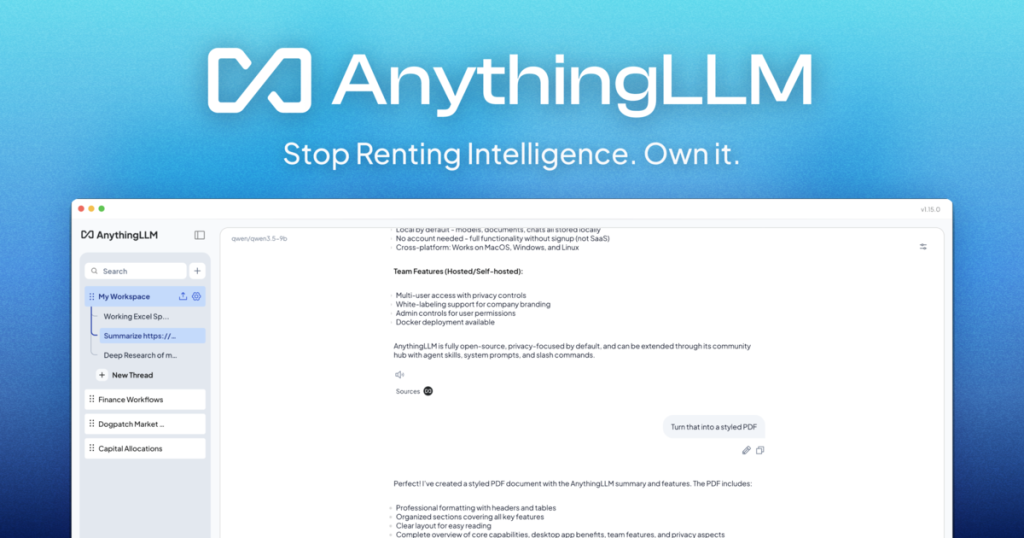
But the paths diverge fast. AnythingLLM positions itself as the complete package—RAG, agents, workspace isolation, user management, and a web UI all baked in. You upload a PDF, create a workspace, and start chatting. Flowise is built around visual workflows; you drag nodes around a canvas to wire up LLMs, memory, tools, and retrieval chains. LocalAI is narrower by design: it’s primarily an OpenAI-compatible API server with some basic web UI bolted on. It wants to be the inference layer, not the application layer.
That distinction shapes everything downstream.
Docker Deployment and Initial Setup
AnythingLLM ships with a straightforward compose file. You pull the image, point it at a volume for documents, wire up your LLM provider (Ollama, OpenAI, whatever), and you’re mostly done. On my test rig—a 32GB RAM machine running Docker on Ubuntu 22.04—it was running in under two minutes. The web UI boots and walks you through workspace creation.
Flowise adds a step. It’s Node-based, so the container has more dependencies. Deployment is fine, but I noticed the initial startup takes longer, maybe four or five minutes on first pull. Once it’s up, you’re looking at a canvas-based interface. If you’re comfortable with node graphs (like n8n or Make), it feels natural. If you’re not, it’s an additional learning curve before you can actually use the thing.
LocalAI is the leanest. Single binary, minimal dependencies. It runs fast. The tradeoff is that there’s no built-in UI for document management or multi-user workspaces. You get an API endpoint and a basic web chat interface. If you want more, you either build it yourself or wrap LocalAI with something else.
Here’s a basic AnythingLLM compose to give you the shape of it:
version: '3.8'
services:
  anythingllm:
    image: mintplexlabs/anythingllm:latest
    container_name: anythingllm
    environment:
      - STORAGE_DIR=/app/server/storage
      - LLM_PROVIDER=ollama
      - OLLAMA_BASE_PATH=http://ollama:11434
    volumes:
      - anythingllm_storage:/app/server/storage
    ports:
      - "3001:3001"
    depends_on:
      - ollama
  ollama:
    image: ollama/ollama:latest
    container_name: ollama
    ports:
      - "11434:11434"
    volumes:
      - ollama_data:/root/.ollama

volumes:
  anythingllm_storage:
  ollama_data:
Document Handling and RAG
This is where the three split into different categories. AnythingLLM handles file uploads directly through the web UI. Drop a PDF, watch it chunk and embed, ask questions. The workflow is seamless enough that a non-technical person can use it. Behind the scenes, it’s using LlamaIndex or similar for chunking, and it gives you configuration options—chunk size, overlap, embedding model—all accessible through settings.
Flowise also supports document uploads, but they’re wired into the workflow graph. You add a document retrieval node, configure it, and connect it to your LLM node. More flexible, but you’re building a workflow each time instead of just uploading to a workspace and chatting. Good if you’re building something bespoke. Annoying if you just want to ask questions about a document without thinking about architecture.
LocalAI doesn’t have native document handling. You can point it at a documents folder and it will try to serve files through its API, but there’s no RAG pipeline built in. If you want RAG with LocalAI, you’re integrating something else—like Qdrant or Milvus for vector storage, and writing the retrieval logic yourself. That’s not inherently bad, but it’s work.
I ran a test on all three with the same ~50-page PDF. AnythingLLM indexed it in about 90 seconds, chunks around 800 tokens, and retrieval felt accurate. Flowise took longer to set up but retrieved results that were comparably good once the workflow was running. LocalAI didn’t do this out of the box, so I skipped the comparison.
Multi-User and Workspace Isolation
AnythingLLM includes user management, API keys, workspace permissions, and the ability to invite people into workspaces. Each workspace is isolated; one person’s documents don’t leak into another’s. This matters if you’re running this for a family or a small team. The UI is straightforward: create a user, send them an invite link, they log in. Done.
Flowise doesn’t have first-class user management in the same way. You can restrict access at the Docker level (basic auth, proxy-level auth), but there’s no built-in user model tied to workflows or documents. If you need per-user isolation, you’re either running separate containers or reverse-proxying with something like Nginx and handling auth externally. It’s doable but adds overhead.
LocalAI is similar to Flowise—no native multi-user system. You’d put something like Keycloak or OAuth2-Proxy in front of it to handle authentication, but that’s outside the tool itself.
For a homelab where you’re the only user, this doesn’t matter. For anything involving other people, AnythingLLM has the advantage.
Agents and Tool Calling
AnythingLLM has basic agent support. You can configure it to use tools (web search, code execution, document querying) and let the model decide when to call them. It’s functional but fairly constrained—you’re not writing complex multi-step agent flows. It’s more “LLM with fallback capabilities” than a full agentic framework.
Flowise is built for this. Want an agent that searches the web, retrieves from your documents, and then calls an API? Wire it up in the node graph. The mental model is flexible. If you’re building anything agentic, Flowise is where you should be. It’s the reason people choose it over the simpler alternatives.
LocalAI is an API server, full stop. Agents are your responsibility. You write the logic, you call the API. Some people view this as elegant simplicity. Others view it as “why am I building this myself.”
Performance and Resource Use
I ran all three against a Mistral 7B model via Ollama on the same hardware. Response times were roughly equivalent—the bottleneck is the LLM, not the wrapper. Memory use is where they differ slightly.
AnythingLLM runs around 200-300MB at idle, scales up with concurrent users. Flowise is similar, maybe a bit heavier on first launch because of Node dependencies. LocalAI is lighter at baseline—maybe 80-100MB—but that’s because it’s doing less.
On a machine with less than 16GB RAM total, this starts to matter. LocalAI will feel snappier. AnythingLLM and Flowise are fine but require a bit more headroom.
| Feature | AnythingLLM | Flowise | LocalAI |
|---|---|---|---|
| Built-in Document Upload | Yes, workspace-scoped | Yes, workflow-based | No |
| Multi-User Support | Full (users, workspaces, permissions) | No (proxy auth only) | No (proxy auth only) |
| RAG Pipeline | Built-in, configurable | Built-in, node-based | Manual integration |
| Agent Workflows | Basic (limited tools) | Excellent (full node graph) | Manual (API-based) |
| Learning Curve | Shallow (web UI, minimal config) | Moderate (node graph mental model) | Steep (API-first, no UI) |
| Idle Memory | ~250MB | ~280MB | ~90MB |
| Setup Time | ~2 minutes | ~5 minutes | ~1 minute |
| Self-Hosted | Yes | Yes | Yes |
| Open Source | Yes | Yes | Yes |
Where Each One Wins
Pick AnythingLLM if: You want to set it up once, hand it to a family member or colleague, and have them upload documents and chat without knowing anything about LLMs or Docker. The workspace isolation means you can actually share this safely. It’s the most “application-like” of the three.
Pick Flowise if: You’re building something specific—an agent that chains multiple tools, a workflow that processes documents in a particular way, or a system that needs visual workflow design. You’re comfortable learning the node graph paradigm and you want maximum flexibility in how the pieces connect.
Pick LocalAI if: You need a lightweight API server, you’re integrating it into a larger system, or you want to build the UI and business logic yourself. It’s the “just the engine” option, and that’s valuable if you know what you’re building.
Things That Surprised Me
AnythingLLM’s workspace isolation is more solid than I expected. You can actually run this in a shared environment without leaking context between users. That’s non-trivial.
Flowise’s node graph feels overkill until it doesn’t. Once I needed to build something with conditional logic and multiple LLM calls, I understood why people choose it. The flexibility is real.
LocalAI is faster to boot and lighter on resources, but that speediness only matters if you’re wrapping it with something competent. Deploying it solo and expecting people to call an API endpoint is a hard sell for homelab use.
The thing I didn’t expect: all three have decent vector storage integration, but none of them make it trivial to swap embedding models or vector databases without redeploying. If you’re planning to evolve your setup over time, budget for some migration work.
FAQ
Can I run all three on the same machine?
Yes. Each has distinct ports and storage paths, so there’s no inherent conflict. Just make sure you have enough total RAM—all three running simultaneously with active Ollama instances would need 32GB+ to stay comfortable.
Which is easiest to set up for a beginner?
AnythingLLM by a wide margin. The web UI walks you through everything. Flowise requires understanding node graphs. LocalAI requires API knowledge. If you’re new to this, start with AnythingLLM.
Does AnythingLLM support remote LLMs like OpenAI?
Yes. You can point it at OpenAI, Anthropic, or any OpenAI-compatible API (including LocalAI itself, creating a kind of awkward nested setup). Configuration is a dropdown in the settings.
Which handles the largest documents best?
AnythingLLM and Flowise both support chunking and embedding large PDFs without much fuss. LocalAI requires you to handle document preprocessing yourself. For documents over 100 pages, AnythingLLM’s built-in chunking strategy is worth the simplicity.
Can I migrate from one to another later?
You can export documents and embeddings from AnythingLLM and Flowise (they use standard storage formats), but there’s no automated migration tool. Plan for manual work if you switch.
Explore AnythingLLM in our AI Homelab Toolkit.
Your turn
Which would you pick?
Tell me what you run and why. If your experience differs from this comparison, I would like to hear it.
 Flowise Docker Compose Setup: My Homelab Config with Explanations
 How Hugging Face Works: Architecture for Self-Hosters
 How Flowise Works: Architecture and Data Flow Explained