RDP Wrapper (RDPWrap) is a free, open-source tool that enables multiple concurrent Remote Desktop sessions on Windows — including editions like Windows 10/11 Home and Pro that Microsoft normally limits to a single session. It works by wrapping termsrv.dll (the Remote Desktop Service) instead of patching it, so Windows updates don’t permanently break it — you just refresh a config file. This page covers what it is, whether it’s safe, how to install it in 2026, and how to keep it working after Windows updates.
rdpwrap.ini. The original project’s bundled ini is outdated — you need the community-maintained one (details below). If you want a fully supported, licensed option for business use, see Thinstuff further down.What RDP Wrapper actually does
Windows client editions ship with Remote Desktop, but Microsoft restricts them to one active session at a time — a second login kicks the first user off. RDPWrap sits between Windows and termsrv.dll and re-enables the multi-session capability that already exists in the code but is disabled by license policy. Because it wraps rather than modifies the DLL, it survives most updates as long as the config knows the offsets for your specific Windows build.
Is RDP Wrapper safe?
RDPWrap itself is open-source — you can read exactly what it does on GitHub. The real risks are around it, not in it:
- Fake downloads. Search results are full of re-hosted installers bundled with adware or worse. Only download from the official GitHub releases.
- Antivirus flags. Because it modifies how a system service loads, some AV tools flag it as a “HackTool” or “RemoteAdmin” — that’s a heuristic on its behavior, not proof of malware. Still, verify the source.
- Licensing. Enabling multiple sessions on Windows client editions may violate the Windows EULA. For a home lab or a single admin, that’s a personal call; for a business, use a licensed solution (Thinstuff) instead.
- Exposure. Never expose RDP directly to the internet. If you need remote access, put it behind a VPN or tunnel — see the reverse-proxy and Tailscale guidance in our Remote Access hub.
The rdpwrap.ini problem (this is why it “stops working”)
This is the single biggest source of confusion. RDPWrap needs to know memory offsets inside termsrv.dll, and those change with every Windows update. The offsets live in a file called rdpwrap.ini. The original project’s bundled ini has not kept pace with recent Windows 10 22H2 and Windows 11 builds — which is why a fresh install often shows “Listener state: Not listening” or “[not supported]”.
The fix is to replace the bundled ini with the community-maintained version, which is updated far more frequently for new builds:
github.com/sebaxakerhtc/rdpwrap.ini
rdpwrap.ini latest (sebaxakerhtc) for Windows 11 24H2/25H2
If RDP Wrapper stopped working after a Windows update, you almost never need a new installer. You need a newer rdpwrap.ini. The community file is maintained in the sebaxakerhtc repository on GitHub, and that is the only place to get it:
- Repository: github.com/sebaxakerhtc/rdpwrap.ini
- The file itself (raw): raw.githubusercontent.com/sebaxakerhtc/rdpwrap.ini/master/rdpwrap.ini
I link to the source instead of hosting a copy, because the file changes whenever Windows does and a copy here would go stale.
Does it cover my Windows 11 build?
Support is per build, not per Windows version. Open RDPConf.exe and note the termsrv.dll version it shows (on Windows 11 24H2 it starts with 10.0.26100). Then open the ini in a text editor and search for that exact version in square brackets. If the section is there, your build is covered. If it is not, nobody has added the offsets for that build yet, and the only options are to wait for the repository to be updated or to hold back the Windows update.
Replace the ini and restart the service
Save the raw file as rdpwrap.ini, then run these in a Command Prompt opened as Administrator. Stopping the service drops any active remote session, so do it while sitting at the machine.
net stop termservice
copy /Y rdpwrap.ini "C:\Program Files\RDP Wrapper\rdpwrap.ini"
net start termservice
Run RDPConf.exe again. You are looking for [fully supported] and Listener state: listening.
RDP Wrapper 1.6.2 download
v1.6.2 is the installer release listed on the official project page, and it is the one the community ini is used with. Download it only from the official GitHub releases. Sites offering a “newer” or “updated 2026” installer are re-hosting someone else’s build; the part that actually gets updated is the ini above.
Antivirus warnings
Some antivirus tools flag or quarantine the RDP Wrapper files because of what the tool does to a system service. That is covered under Is RDP Wrapper safe? above. If you choose to add an exclusion, scope it to the RDP Wrapper folder only, and only for files you downloaded from the two GitHub sources on this page.
How to install RDP Wrapper (2026)
These are the standard steps the community uses. Do this on a machine you own, with a full backup or restore point first.
1. Download from the official source
Get the latest release ZIP from the official RDPWrap GitHub project (github.com/stascorp/rdpwrap). Extract it to a permanent folder such as C:\RDPWrap — not a temp folder, because the service points at these files.
2. Run the installer as Administrator
Right-click install.bat and Run as administrator. It installs the wrapper and registers the service.
3. Replace the ini with the community version
Download rdpwrap.ini from the community repo above and copy it over the one in your install folder (usually C:\Program Files\RDP Wrapper\rdpwrap.ini). You may need to stop the Remote Desktop service first, replace the file, then start it again.
net stop termservice
copy /Y rdpwrap.ini "C:\Program Files\RDP Wrapper\rdpwrap.ini"
net start termservice
4. Verify with RDPConf
Run RDPConf.exe. You want to see all-green: Wrapper installed: yes, Wrapper running: yes, Listener state: listening, and [fully supported] next to your termsrv version. If it says [not supported], your ini doesn’t have offsets for your exact build yet — grab the newest community ini or wait for it to be updated.
Windows 11 and 24H2 compatibility
RDPWrap works on Windows 11 and recent 24H2 builds when the community ini has been updated for that specific build number. New Windows builds sometimes ship before the ini catches up, which creates a short window where multi-session breaks until a contributor adds the new offsets. If you rely on this in production, don’t install Windows feature updates immediately — wait until the ini supports the new build.
Common problems and fixes
- “Listener state: Not listening” — service isn’t running or the ini lacks your build. Restart
termservice; update the ini. - “[not supported]” — your termsrv.dll version isn’t in the ini. Use the newest community ini.
- Second session still disconnects the first — the wrapper isn’t actually active; re-run
install.batas admin and re-check RDPConf. - Broke after a Windows update — expected. Replace the ini with the latest community version; you rarely need to reinstall the whole thing.
- Antivirus deleted it — add an exclusion for the install folder only if you trust your download source.
Gear that pairs with a headless RDP box
Small add-ons that fix the usual headless-RDP annoyances — prices shown in your local Amazon store.
 HDMI Dummy Plug (4K)Fixes the classic headless problem: low-res or black RDP screens on machines with no monitor attached.~AED 25View on Amazon →
 TP-Link Tapo P110 Smart PlugRemote power-cycle for a frozen box — when RDP stops responding, cut the power from your phone.~AED 45View on Amazon →
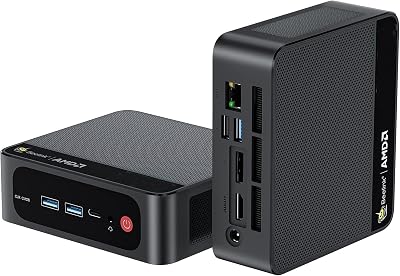 Beelink SER5 Mini PCA compact, quiet always-on Windows box — the ideal dedicated RDP target.~AED 900View on Amazon →
As an Amazon Associate I earn from qualifying purchases.
When to use something else
RDPWrap is great for a home lab or a single power user. It’s not the right answer for a business, because of the licensing question and the maintenance burden of chasing ini updates.
- Licensed multi-session RDP for business: Thinstuff XP/VS Server does the same thing legitimately, with support.
- Just need to reach one PC remotely: a dedicated remote desktop app is simpler and safer — see Jump Desktop, Parsec, or NoMachine.
- Self-hosted, browser-based access to many machines: Apache Guacamole.
- Open-source TeamViewer alternative: RustDesk.
For the full picture of remote access options, see the Remote Access hub.
Turn this box into a local AI machine
If you already have a Windows PC you remote into, it can do more than host desktops. The same machine can run AI models locally, with no cloud account and no per-token bill, and you reach it over the same remote session.
- Check what your PC can run — pick your graphics card and memory and see which models fit.
- Ollama — one command to download and run a model.
- LM Studio — the same idea as a desktop app, no terminal needed.
- Open WebUI — a ChatGPT-style page in your browser, served from your own PC.
- Local LLMs hub — hardware, models and setup in one place.
Frequently Asked Questions
Does RDP Wrapper still work in 2026?
Yes, on Windows 10 and 11 — but only with an up-to-date rdpwrap.ini. The bundled ini is outdated; use the community-maintained one.
Is RDP Wrapper safe?
The tool is open-source and wraps rather than patches termsrv.dll. The risks are fake downloads, AV heuristic flags, EULA licensing, and internet exposure — download from official GitHub and keep RDP behind a VPN.
Why did it stop working after a Windows update?
Updates change termsrv.dll offsets. Replace rdpwrap.ini with the latest community version — you rarely need to reinstall.
Is there a legal alternative for business?
Yes — Thinstuff XP/VS Server provides licensed multi-session RDP with support.